One of the greatest advantages of our current society is the power of change and evolution: the ability to make the world a place for everybody, regardless of their circumstances. Today, public buildings increasingly offer accommodations by default and remind us that not everybody fits one single template. And, luckily, we’re taking this beyond the physical restraints.
Every now and then, though, you still see ideas that show how far we have to go. There was a tweet circulating that said disabled parking should only be valid during business hours, because, apparently, people with “genuine disabilities” wouldn’t be out at night or on weekends. The best reply nailed the problem in one line: “We’re disabled, Daniel, we’re not werewolves.”
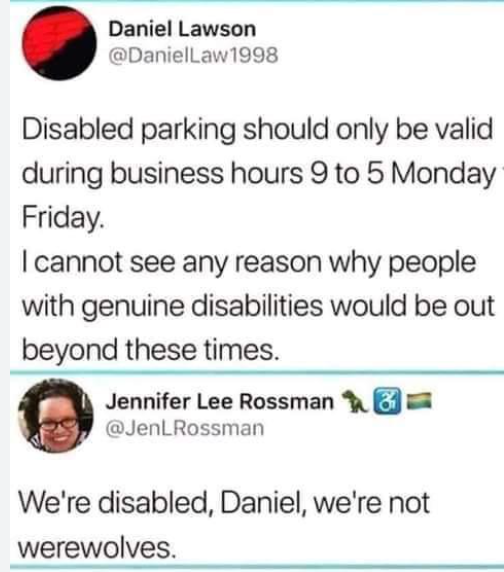
That’s exactly the mindset digital accessibility is trying to move us away from: the idea that disabled people only need access at limited times, in limited ways, for limited activities.
We are entering a new chapter of digital accessibility where a new federal rule sets clearer, stricter standards for digital accessibility at public institutions, including UMD. So what does this mean for you if you’re a student, instructor, staff member, or run a unit or student org at UMD? Let’s break it down.
The new ADA rule applies to a big chunk of the digital world we rely on every day:
- Course sites and materials
- Student and employee portals
- Online forms and applications
- Videos, PDFs, and handouts posted online
- Many mobile apps and tools we use to do university business
If a student needs a screen reader, captions, a keyboard instead of a mouse, or other assistive tech, they should be able to use your content without jumping through hoops or relying on last‑minute fixes; that’s the heart of this new standard.
The technical requirement behind the scenes is something called WCAG 2.1 Level AA, a set of about 50 international guidelines designed to make websites and apps accessible to people with disabilities, covering vision, hearing, and cognitive needs. It sounds like a robot designation, but the main idea is simple:
- People must be able to perceive your content (for example, images have text alternatives, videos have captions).
- They must be able to operate it (no “mouse‑only” menus; keyboard navigation works)
- It should be understandable (clear structure, headings, predictable navigation).
- And it should be robust, so assistive technologies can work with it.
In practice, that looks like properly using headings in documents and on webpages, not posting scanned images‑only PDFs, providing captions or transcripts for videos, avoiding tiny low‑contrast text, and making sure interactive content works without a mouse.
You probably noticed that some of the rules when trying to use or download certain software started to change (that famous question, “Will this tool be considered essential for the performance of your job?” is not included in the expedited software review request form for no reason); UMD was getting ready to deliver good practices.Students and employees with disabilities have the right to access the same information, at the same time, in the same way as everyone else.
This might sound like a Disability Support Services problem, but it’s very much also a SPARCS problem, as non‑accessible content can lead to complaints, audits, or legal action. Making content accessible usually means it’s better structured, easier to inventory, and easier to protect; if you know where your files live and who can access them, it helps everyone, not just people who use screen readers.
If you create or share digital content as part of your role at UMD, you’re also part of this story. Digital accessibility goes hand in hand with using official, supported tools.
When content is scattered across personal websites, unvetted apps, or random cloud accounts, it’s harder to keep it secure, private, and accessible. Using UMD‑supported systems means:
- The platform is more likely to support accessibility features.
- Central teams can help fix issues.
- We can apply consistent standards and protections.
So when you’re deciding where to post that form, video, or resource, choosing the official tool isn’t just a “security thing,” it’s an accessibility thing, too.