
As of May 1, 2026, the world was made aware of a breach of Instructure - the company that owns and runs the Canvas learning management system. This breach directly affected the University of Maryland students, faculty, and staff due to the nature of use of Canvas. For students, Canvas is vital for completing classwork, tracking assignments and grades, and communicating with professors or other classmates. For faculty, Canvas is vital to running and maintaining the courses you teach. For staff, Canvas provides a platform for trainings and microcredentialing. We may have all felt the impact of this breach, and maybe you are left wondering if there are any hidden impacts. Let's talk about what we know about this breach and how it may have impacted you.
What happened?
Instructure detected unauthorized activity on April 29, 2026. The breach was carried out by ShinyHunters (who claimed responsibility for this) and according to public record, they successfully exfiltrated ~3.65 terabytes of data which covers upwards of 275 million users across almost 9,000 educational institutions worldwide. ShinyHunters placed the following claim onto Canvas, which users may have seen if they accessed it on May 7, 2026:
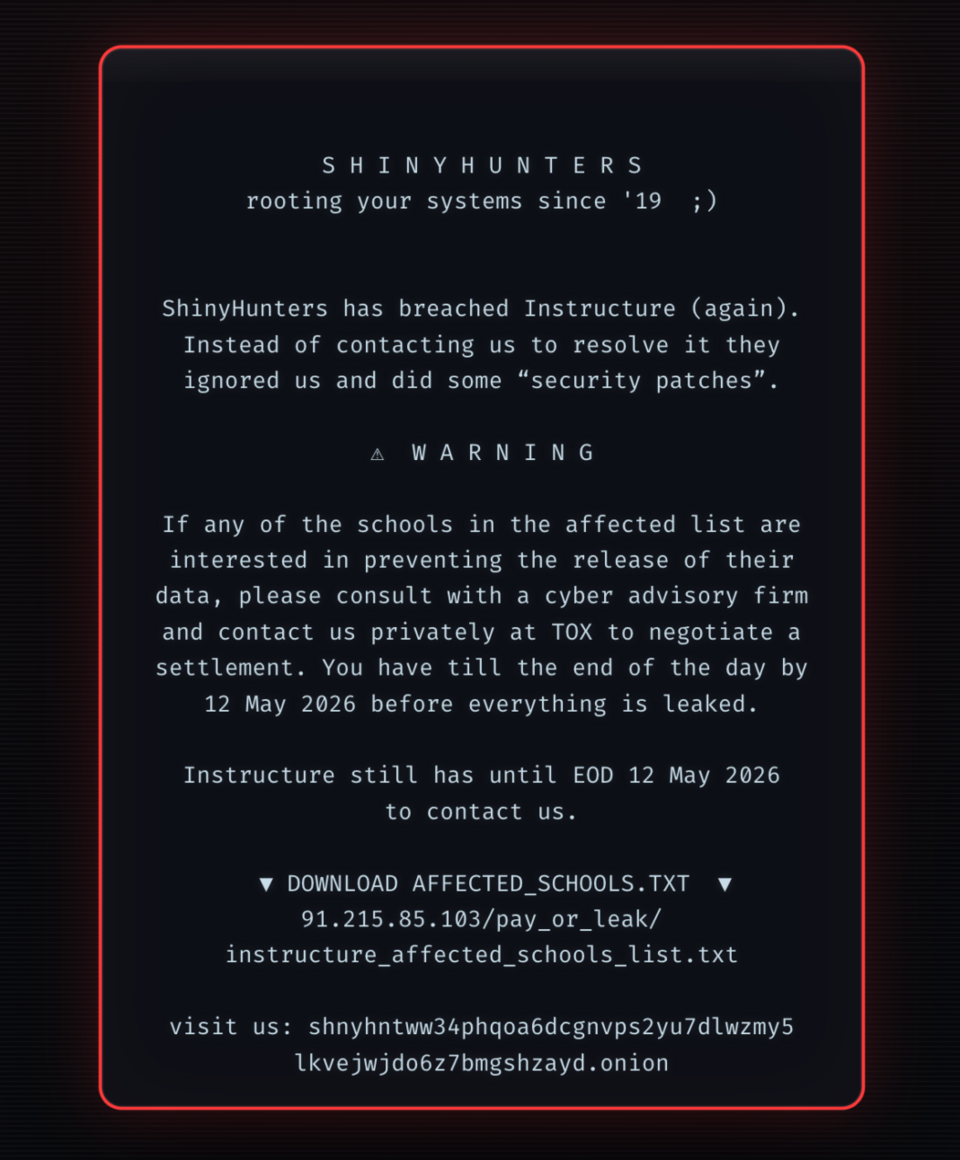
In this claim, you will notice that this is an example of a ransomware attack, but also extortion--ShinyHunters were holding the data and threatened to leak it all if their demands were not met. The only interesting thing about this is that Instructure still had access to the data, making this not meet the full definition of a ransomware attack (an attack where access to data is locked until the demands are met, typically a payment). This part of the attack only lasted for 10 minutes, since this occurred over a week after the unauthorized access was detected and Instructure had their defense heightened.
How can this impact me?
Instructure has yet to notify affected individuals of this breach, and it is valid to be upset and uncomfortable about this breach. As a result of this incident, here are things you can and should do to secure your data:
- Be aware of common scams such as phishing (done over text/email) or vishing (done over a phone call).
- Enhance your passwords. Make them complex!
- Think before you click: does that email look weird, or does it feel abnormal? Before clicking any links, stop and consider if this is something you think you should be receiving. Always take the cautious side, and call a trusted company representative if you need confirmation of its legitimacy.
- If someone is asking you for sensitive information, it is probably not right: don’t provide information just because it is asked for, don’t be scared to push back and ask questions.
What is Instructure doing about it?
You can find a dedicated page providing updates on this incident, Canvas operations have been restored and Canvas is safe to use thanks to the locating and patching of the vulnerabilities that allowed this attack to happen, customer service teams have been made available to assist you with your questions and concerns, CrowdStrike (one of the leading cybersecurity technology companies) has been brought in to help support Instructure in performing forensic investigations of the incident, CrowdStrike is also assisting in locating and resolving any other existing weaknesses in the systems security. On top of all of these things, Instructure has also reached an agreement with ShinyHunters to return and delete all of the data that they exfiltrated.
What is UMD doing about it?
Since UMD is an institution that uses Canvas, it is important that we address this as well. UMD has been working diligently to address our concerns about this issue, as well as ensure that the security of Canvas is adequate for our campus community moving forward.
Though this likely isn’t the first time you have heard of something like this happening, it may have been the first time you have experienced an incident like this with your own data potentially involved. Stay vigilant and aware of potential attacks that can impact you such as phishing or vishing attempts, use strong passphrases, and feel free to contact itsupport@umd.edu if you have any concerns or to report any issues.